Using the FlexNet server
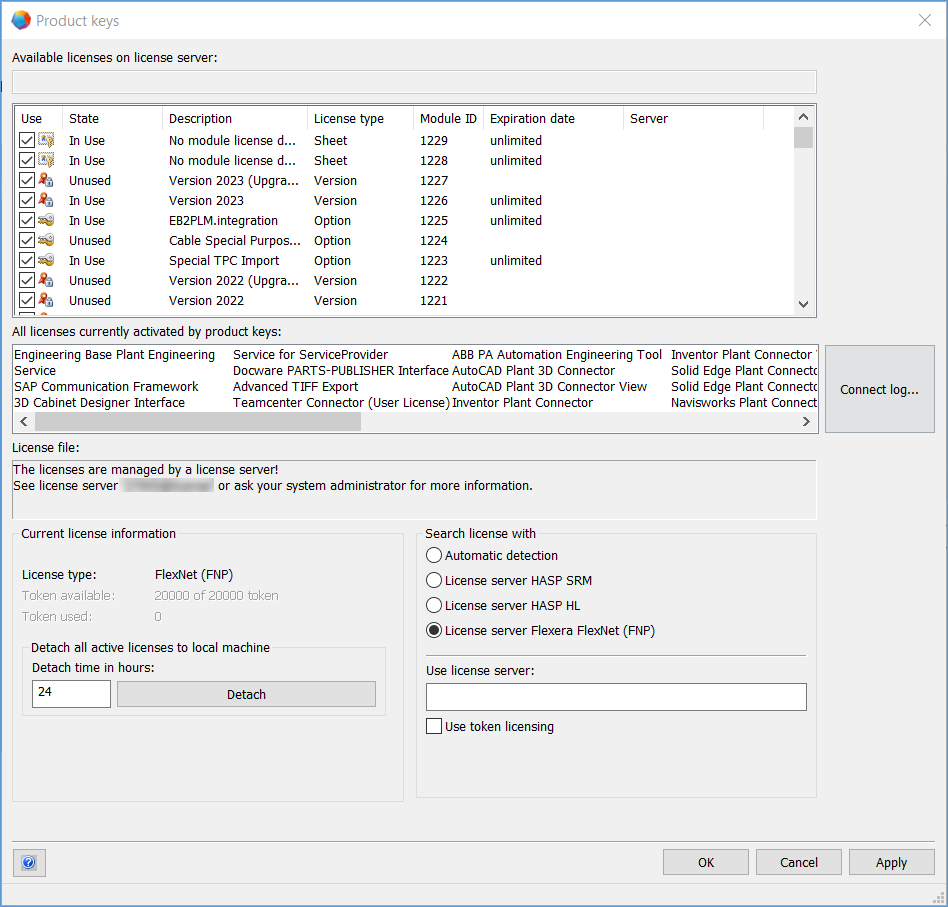
Engineering Base offers the option to use the Flexera FlexNet server as license server. To activate FlexNet, you can use the Product keys dialog of the Help menu.
Here, you can also select the required licenses from the available licenses.
To use the FlexNet server
- On the client computer, open Engineering Base.
- On the Help menu, click Product keys....
- This opens the Product keys dialog.
- In the area Search license with select License server Flexera FlexNet (FNP).
- In the Use license server: field, enter the license server: The name has the structure "port number"@"license server" (the default port is 27005).
- If you are using the token licensing, check the checkbox Use token licensing.
- The upper part of the dialog will then also display the Token column outlining the number of tokens that each license requires.
- Select the required licenses.
- Click Apply.
- If you want to detach all licenses to a local machine, specify in Detach all active licenses to local machine the Detach time in hours: and click Detach.
- This detaches all active licenses to the local machine. You can recall the detachment at any time.
- Click OK.
Detaching licenses requires the Dynamic License Manager option.