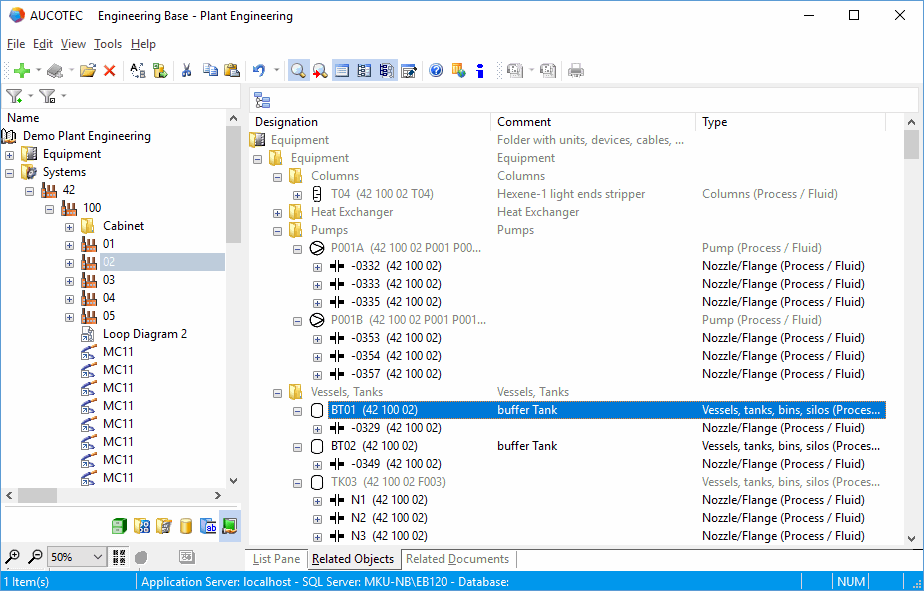
Related objects
An object in Engineering Base is a data unit consisting of attributes and properties which is displayed in the navigation pane, on worksheets or in documents.
Engineering Base offers four views designed to list data complementing the information displayed in the Explorer: List pane, Attributes list, Related documents and Related objects.
The Related objects view helps you to quickly and efficiently search through the equipment and other related objects that are, for instance, associated with a selected function or process.
Related objects view
- Display of all parent, child and sibling objects of objects associated with the selected object, e.g. a function.
- Gray out all parent, child, and sibling objects not associated with the selected object.
- For Part of objects, all related objects are listed up to the uppermost place, including the entire equipment structure.
- The equipment name contains a bracket displaying the names of the associated functions.
To activate or deactivate the Related objects view
- In the View menu, click Related documents or the icon in the toolbar.
You can also activate the Related objects view in the Engineering Base Explorer in Visio by clicking .
- The Related objects tab displays all associated objects in their hierarchical structure in the respective project folders, starting from the equipment located at the uppermost place.
- Click to activate or deactivate the display of the sibling objects.
You can navigate to the related equipment or sheet by clicking Navigate on the shortcut menu.