Navigation
In the Engineering Base databases, various assignments and associations exist between individual objects and between shapes and objects. Using the Navigate function, you can navigate from one object to another object via these associations (assignments and associations).
The shortcut menu item Navigate shows the same navigation targets at an object and at the associations below the linked objects.
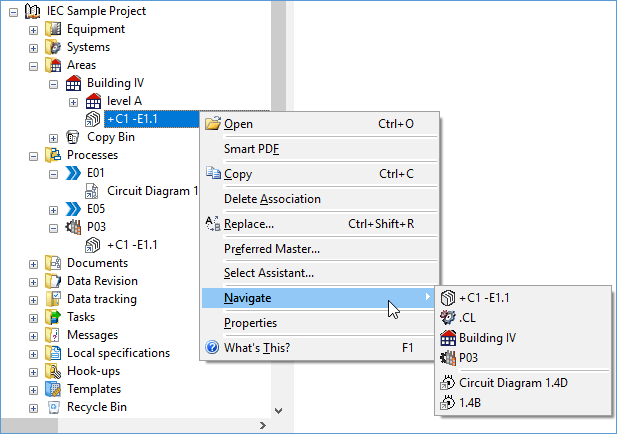
In this context, navigating offers you the following functionality:
- The shortcut menus of shapes contain the same navigation targets as the objects they represent, including all representation associations. Clicking a representation association opens the associated sheet in Visio and marks the shape on the sheet.
- The shortcut menu of the wires contains the attribute contents of the wires to destination 1 and destination 2 in the list of the navigation targets.
- The shortcut menu of sheets contains the attribute contents of the following attributes in the list of the navigation targets:
- Starting from objects of the following types, you can navigate to process scenarios and operating modes via the shortcut menu:
- Device
- Device State
- Function
- Flow Stream
- Flow Stream State
- Wire
- Cable
- Sheet
- Unit
The shortcut menus of process scenarios and operating modes do not have a navigation function. You can navigate to the associated objects via the associations below the process scenarios and operating modes.