Object type and Associations filter
To reduce the amount of data displayed in the navigation pane and in the Engineering Base Explorer in Visio, Engineering Base offers two filters to mask object types and object associations.
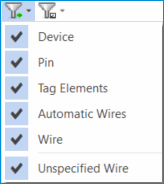
Global types and object types that may be masked in the default filter:
- Device
- Pin
- Tag Elements
- Automatic Wires
- Wire
- Unspecified Wire
The selection of the objects for the object filter can be individually adapted for the available user groups.
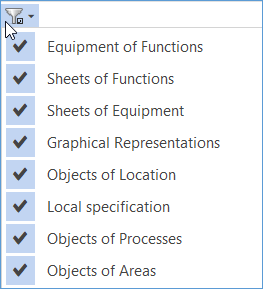
Associations that may be filtered:
- Equipment of Functions
- Sheets of Functions
- Sheets of Equipment
- Graphical Representations
- Objects of Location
- Object Specification
- Objects of the Process
- Objects of Areas
How to mask object types
- Click the arrow of the left filter symbol above the navigation pane or the Engineering Base Explorer.
- The global types and object types defined in the filter will be offered for selection.
- Deselect the object types that are not to be displayed in the navigation pane or in the Engineering Base Explorer:
Device
All devices are masked in the navigation pane or in the Engineering Base Explorer.
Pin
All pins are masked in the navigation pane or in the Engineering Base Explorer.
Tag Elements
All tag elements are masked in the navigation pane or in the Engineering Base Explorer.
Automatic Wires
All automatic wires are masked in the navigation pane or in the Engineering Base Explorer.
Wire
All wires are masked in the navigation pane or in the Engineering Base Explorer.
Unspecified Wire
All unspecified wires are masked in the navigation pane or in the Engineering Base Explorer.
- Click the filter symbol to activate the filter settings.

How to mask associations
- Click the arrow of the left filter symbol above the navigation pane or the Engineering Base Explorer.
- The associations defined in the filter will be offered for selection.
- Deselect the associations that are not to be displayed in the navigation pane or in the Engineering Base Explorer:
Equipment of Functions
All associated equipment is masked in the Systems folder.
Sheets of Functions
All associated sheets are masked in the Systems folder.
Sheets of Equipment
All associated sheets are masked in the Equipment folder.
Graphical Representations
All associated diagrams (graphic representations) are masked in the navigation pane or in the Engineering Base Explorer.
Objects of Location
All associated objects of the locations are masked in the Areas folder.
Local specification
All associated objects are masked in the Local specifications folder.
In addition, associations between devices will be masked (role 119).
Objects of the Process
All associated objects are masked in the Process folder.
Objects of Areas
All associated objects of the areas are masked in the Areas folder.
- Click the filter symbol to activate the filter settings.

If you set a filter in the navigation pane, it is inherited by the Engineering Base Explorer in Visio if you open a drawing in Visio subsequently.