Attributes list
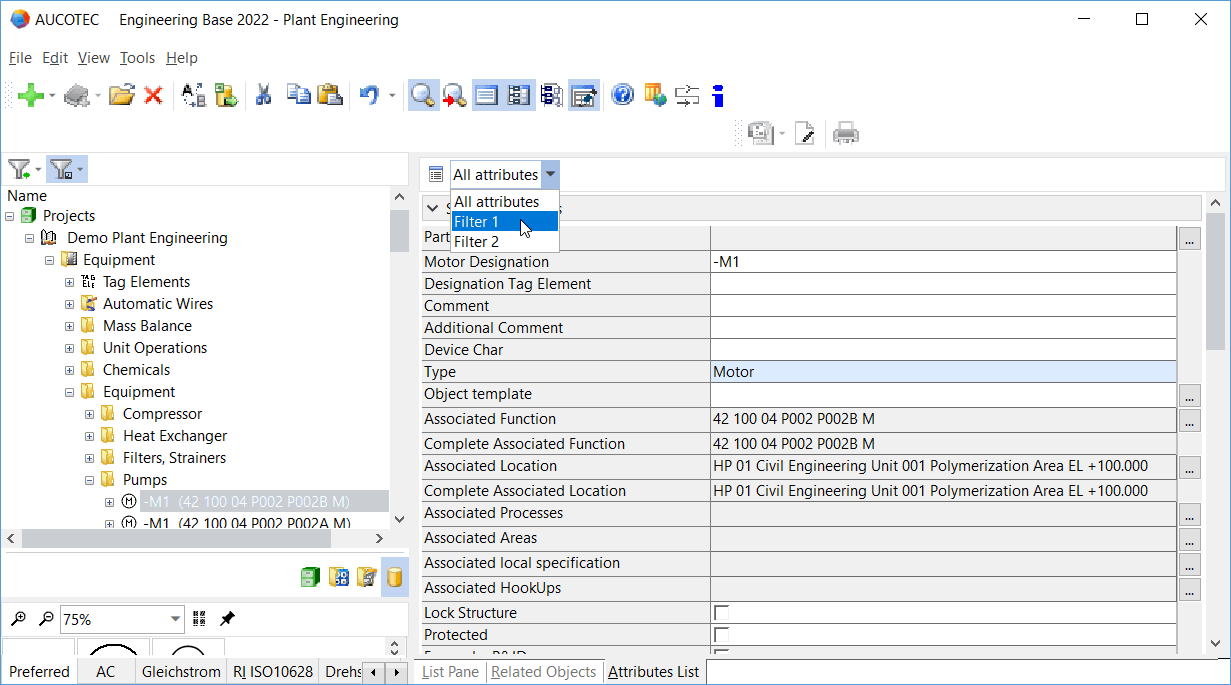
In addition to the views List Pane, Related Objects and Related Documents, Engineering Base offers the possibility to display all attributes or your favorite attributes of the start object by means of the Attributes List view. This enables you to edit object data quickly and efficiently.
To activate or deactivate the attributes list
- On the View menu, click Attributes List or the icon on the toolbar.
- On the tab Attributes List, all attributes of the marked object will be displayed for editing.
The respective tabs can be expanded or collapsed via the arrow keys .
- Click to sort the attributes alphabetically or to undo the sorting.
- To limit the number of attributes displayed in the attributes list, click the arrow in the selection field All Attributes.
- The displayed list shows all worksheet templates of the project where the attribute Use as favorite for attribute list is selected. The worksheet templates of the database templates are only displayed if there are no corresponding worksheet templates defined in the project.
- Select one of the displayed worksheet templates.
- Now, the attribute list only shows the attributes that are defined as columns in the selected worksheet template.



Using option Show Attribute Properties of the shortcut menu of an attribute name, you can open the attribute properties read-only.