Object history
During the project planning phase, projects and catalogs are revised multiple times and the objects contained therein are changed. To get an overview of the changes that have been made, Engineering Base allows you to record the changes with its history function.
The following data is saved for the changes:
- Either the user or the department
- The date of the change
- The time of the change
- The changed attribute or the changed role
- The old and the new values.
Prerequisites
- Enable the history function in the database properties under General/History and specify whether the user name or the user’s department is to be displayed as information.
- If the user management is enabled for the database, the user must obtain the permissions Enable History and View History under Project Properties/General/Access Control (this precondition only applies to projects).
- Enable the history function in the Project Properties/History or in the Catalog Properties/History.
The object history can be displayed for the following objects:
Project:
- Project
- Sub-folders in the project folder Equipment, unit and equipment
- Sub-folders in the project folder Systems and function
- Sub-folders in the project folder Areas and location
- Sub-folders in the project folder Processes, operation mode and process scenario
- Sub-folders in the project folder Documents, drawing and sheet
- Sub-folders in the project folder Messages and message
- Folder Local Specifications, sub-folder and object in the folder Local Specifications
- Folder Hook-Ups, sub-folder and object in folder Hook-Ups
- Sub-folders in the project folder Tasks, execution task and tasks
- Sub-folders in the project folder Templates, sheet, worksheet and configuration
- Object in project folder Templates/Add-ins.
Catalog:
- Catalog
- Sub-folders and objects in the catalog folder Materials
- Sub-folders and objects in the catalog folder Chemicals
- Sub-folders in the catalog folder Messages and message
- Sub-folders in the catalog folder Templates, sheet, worksheet and configuration
- Object in catalog folder Templates/Add-ins.
To display the object history
- Select one of the aforementioned objects in the navigation pane and select Object History on the shortcut menu.
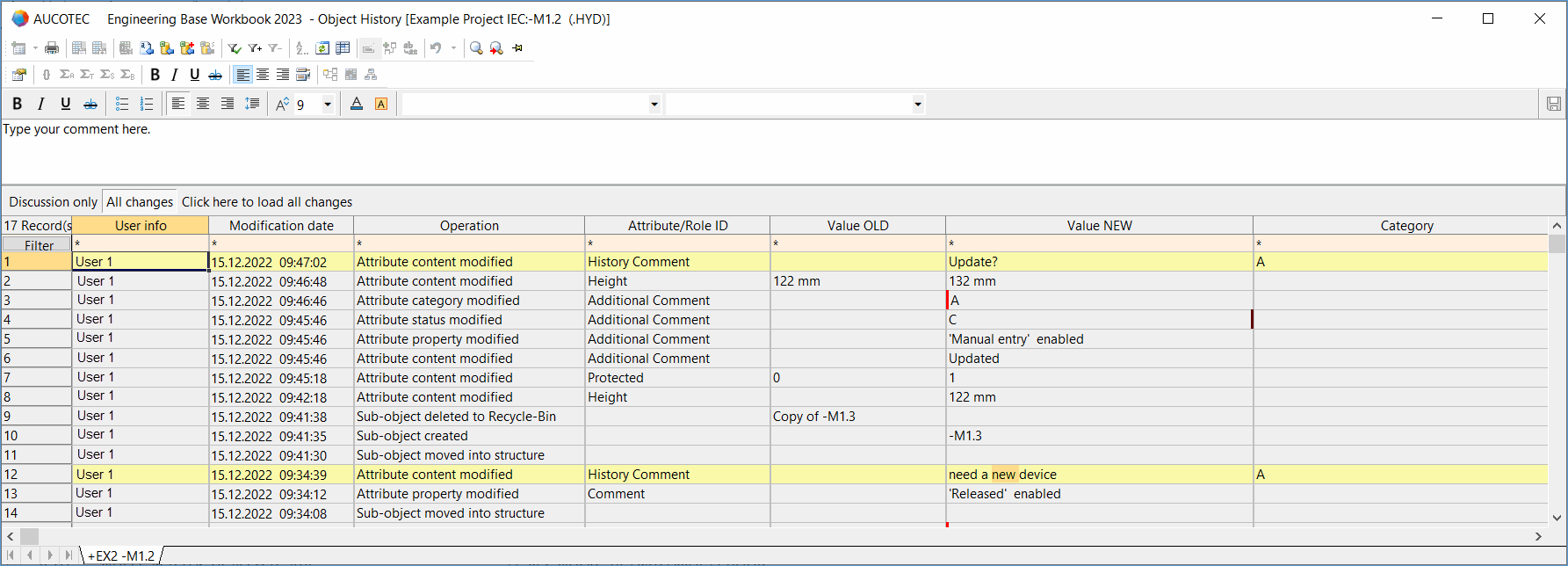
- The worksheet Object History is displayed.
- If required, enter a comment on the implemented changes in the comment field and click to the right to save the comment. The entry of a comment is logged in the object history and highlighted in yellow.
The worksheet has 3 buttons:
Discussion Only
Only the comments are displayed in the worksheet.
All Changes
The entries in the object history are displayed. On opening the worksheet, only the first 1.000 entries will be listed at first.
Click here to load all changes.
All available entries of the object history will be displayed in the worksheet.
The following columns are displayed:
Column
Meaning
Record(s)
Displays the number of existing entries.
User info
Displays who has made a change.
Modification date
Displays the change date and time.
Operation
The following actions in the project or in the catalog are recorded in the history:
- Attribute category modified
- Attribute property modified
- Properties of association modified
- Attribute content modified
This also applies to attribute comments. - Object restored from Recycle-Bin
- Object created
On copying objects in a project or catalog, the history of these objects is not copied. All copied objects obtain the entry Object created.
On copying projects or catalogs, the object history can be copied optionally. To do so, use the function Paste Special. - Object deleted to Recycle-Bin
If a deleted object is deleted from the recycle bin, all entries on this object will be deleted from the history of the superordinate object. - Object moved
- Source of association removed/modified/added
- Attribute status modified
- Sub-object restored from Recycle-Bin
- Sub-object removed from structure
- Sub-object created
- Sub-object deleted
- Sub-object deleted to Recycle-Bin
- Sub-object moved into structure
- Sub-object removed from structure
- Target of association removed/modified/added
Additionally, any changes which are carried out by assistants such as Smart Excel are also recorded. This only applies to projects.
Changes to aggregations are recorded at the respective source and target object.
Attribute/Role ID
Displays the attribute or the role ID that was changed.
Value OLD
Displays the old value of the changed attribute in case that value was updated.
Value NEW
Displays the new value of the changed attribute. This also applies to changes to the attribute properties and set status indicators.
Category
Displays the selected attribute category and/or attribute status that was selected from the toolbar of the comment field.

If the data in the worksheet is sorted or filtered, the entire object history will be loaded automatically.
On exporting projects or catalogs, the history will not be exported.