Creating notes in the navigation pane
You can create notes at the following objects:
- System folders (and sub-folders of) Equipment, Systems, Areas, Processes, Documents and Hook-Ups
- Unit
- Equipment (incl. pipelines and flow streams)
- Local operating mode of an equipment
- Function
- Location
- Area
- Operating mode
- Process scenario
- Drawing
- Hook-Ups
To create a note
- In the navigation pane, select an object from the aforementioned list.
- On the shortcut menu, click New/Note.
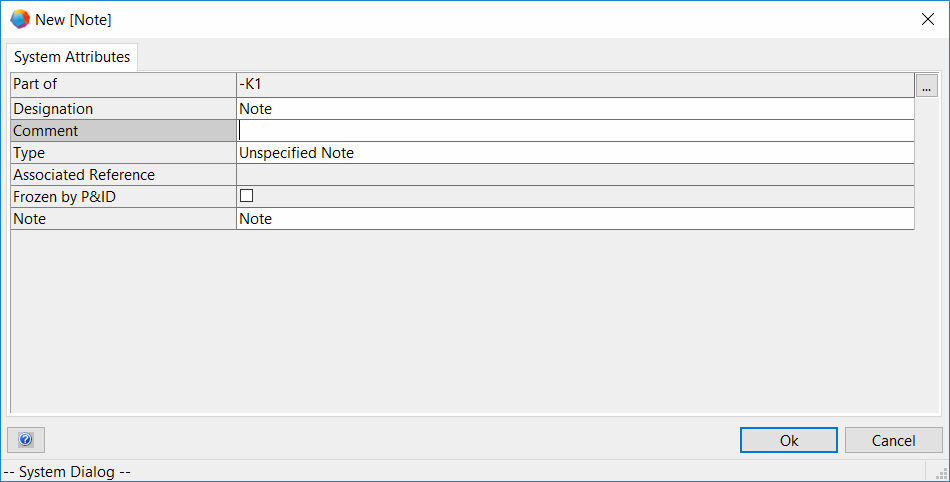
- This opens the New [Note] dialog.
System Attributes
Part Of
The Part of attribute contains the parent object.
Use the button to select the superordinate object.
The displayed selection dialog depends upon the object at which you want to create the note.
Name
Defines the name of the note. The name is shown in the object tree. If you do not know the name, leave the field blank and the comment or the type will automatically be shown instead. If you use the same name more than once, you will see an in the icon.
Comment
In the comment field, you can describe the note in further detail.
Type
Defines the type of the note. The type is displayed in the object tree if neither a comment nor a name have been entered.
Associated Reference
You can associate a note with a pin. The reference to the pin is displayed here.
Frozen by P&ID
This Boolean attribute is set by the P&ID Freeze Assistant if a sheet is frozen on which the note is represented.
Note
In this field, enter the note you wish to position at the object or on the diagram.


- Complete the information as needed and click OK.
You can use the Notes worksheet to display a list of all subordinate notes at one of the aforementioned start objects.