1.5.1 Conversion of Existing Terminals Into Multi-level Terminals
In ELCAD/AUCOPLAN 2018, a new important function is offered in the Terminal Block Designer. If you notice that the available space will not be sufficient, you will now be able to easily convert the terminals of a terminal block to other terminal types (e.g. multi-level terminals).
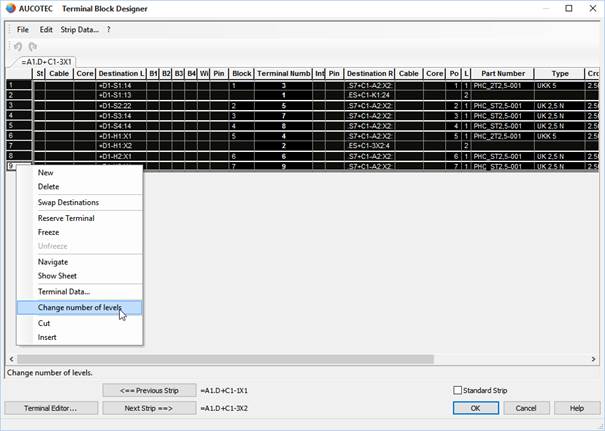
1. In the Terminal Block Designer, mark the terminals that you want to convert to, for example, multi-level terminals. Then, right-click on them.
2. In the subsequent dialog, select the menu item Change number of levels.
3. Then, define the number of levels in the subsequent dialog Change number of levels.
4. After that, you may enter the part number of the new terminals or select it from the device master data by means of the button [...].
5. Confirm your selection by clicking OK to apply the changes.
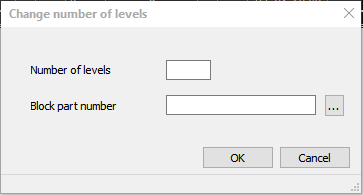
By entering the new part number, an alignment between the device master data and the Terminal Block Designer will be carried out to automatically take over further data such as type and cross-section.
If the number of marked terminals is not divisible by the number of new terminals without remainder, for example in case you want to convert seven single-level terminals into two-level terminals, the next highest number of multi-level terminals will be created with some terminals remaining empty. Empty terminals will automatically be assigned with the terminal designation Terminal.
By means of the same function, it is of course also possible to reconvert multi-level terminals back to terminals with fewer levels or simple series terminals.