3 Editing the Smart Excel Export File
A sheet protection is active in the export file created by the Smart Excel assistant. System fields, formula attribute and primary keys fields are write-protected. All of the remaining data can be changed. Afterwards the changed data can be adopted to Engineering Base via the import function.
If several worksheets had been written to an export file, one sheet will be created per worksheet in the EXCEL file.
When processing the data the following items have to be considered:
· The data formats have to be kept. If a property is defined in Engineering Base as a numerical value, then only a numerical value can be entered in the respective cell.
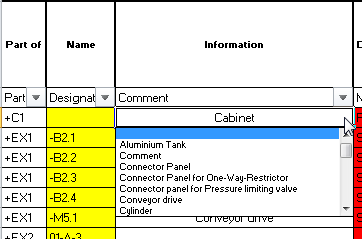
· If a selection list was defined for an attribute in Engineering Base this selection is also available in the export file. If a line is clicked a value can be selected from this list.
The selection lists adopted from Engineering Base are stored in a hidden sheet "SelectValue Worksheet" in the export file.
· When creating new data sets (objects), the write protection for sheets of the export file has to be deactivated.
· The attributes Part of and Type have in any case to be present in the file.
· The value entered into Part of has to refer to existing object structures in the target project, i.e. has to be present in the project.
· The type entered has to conform to a defined EB typ.
· If the values of Part of and Type do not agree with the values of their respective attributes in EB, the attribute value is marked with red color (invalid attribute value) in the preview window, and the data set cannot be imported.