2.5.2 Object navigation with brackets
The square brackets must be set in pairs 'on the same level'. They cover a complete specification of conditions or are completely within a condition. An opening before the condition and closing within the condition are not possible.
The brackets function analogously to Os … Oj (set navigation point and return). An active multiple treatment is as a matter of course not aborted at this point.
|
Key identification [ ] |
Navigation brackets Treatment of the navigation object by 'enclosing in parentheses', i.e. when the evaluation reaches the closing bracket "]", then the navigation object is reset to the initial value, and the statement is further evaluated. |
|
Syntax: [ [+] <statement sequence> ]; |
|
|
+ |
Continue execution at the end of the brackets even if object navigation within the brackets fails. |
|
Examples of object navigation: |
|
|
Formula: |
Value of the formula attribute (character string): |
|
Rb100;[P;A5;]A5; |
Navigation to the function of an object. Navigation is carried out within the brackets to the parent of the function, and the corresponding designation (name =attribute ID=5) is output. Then the name (attribute ID=5) of the function is output. |
|
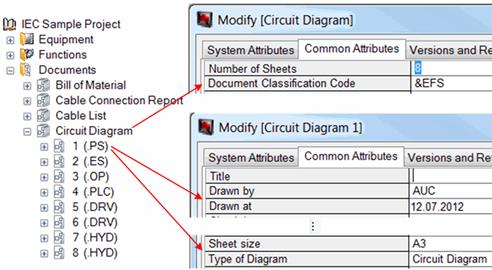
Exercise: A composite sheet number should be created in a sheet, which is made of Document Classification Code according to EN 61355 and the attributes Type of Diagram, Sheet size, Drawn by and Drawn at, separated by “-“. The attribute Type of Diagram of the parent diagram contains the Document Classification Code.
Formula used:
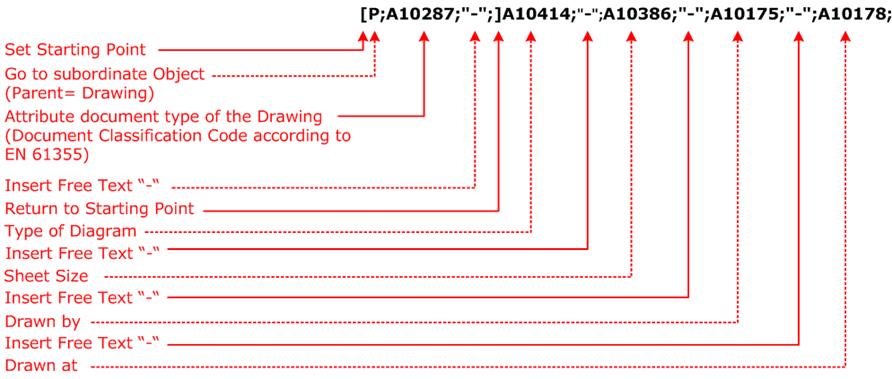
Result of the formula: &EFS-Circuit Diagram-A3-AUC-12.07.2012 |