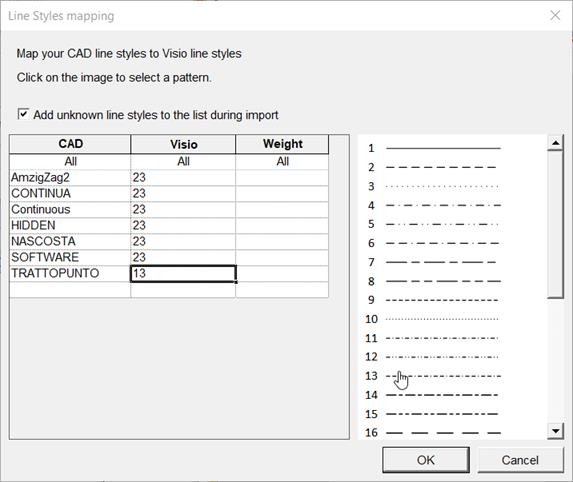
1.1.4 Mapping of Line Styles
In this dialog, you can assign Visio line styles to the line styles of the CAD drawings to be imported.
The available Visio line styles are displayed in a selection list.
· Add unknown line styles to the list during import
Check the check box to display all line styles identified during the import in the dialog.
The columns and their meaning
|
CAD |
Line styles imported from the CAD drawings. |
||||||||||||
|
Visio |
The line style to be assigned in Visio. 1. To assign the line style, click the respective cell in column Visio. The cell is selected. 2. Click a line style in the line styles list. The number of the line style is copied to the cell. |
||||||||||||
|
Weight |
The line width of the Visio line style to be used in the EB drawing in mm. If no line width is defined, the standard line width (Options/General/Graphics) is used.
|