 and sheets
  .
.2.4.1 The Difference between Drawings and Sheets
Drawings and sheets are created and managed in the system folder Documents.
A difference is made between drawings and sheets .
A drawing comprises several drawing sheets and reflects the entire functional relationship of a planning job.
The graphic of this functional relationship can be represented in distributed form on several sheets (distributed representation).
A sheet is an object consisting of a data record in Engineering Base and an MS-Visio object. The data record is offered with the function Open and contains descriptive sheet attributes.
The sheet is opened and edited with the function Open Sheet with Visio. The graphic editing functions for creating a diagram are then available.
How to create a drawing folder for a P&I diagram
1. Click on the system folder Documents and first of all create a new drawing with the name P&I diagram using New / Drawing.
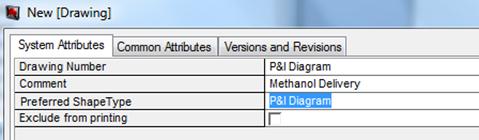
The drawing number specifies the name of the drawing and is displayed in the object tree.
The comment describes the usage of the specific drawing (e.g. Methanol Delivery) and is shown in the object tree if you do not enter a drawing number.
2. Enter the text Methanol delivery as comment.
3. Select P&I Diagram as preferred shape type.
4. Confirm your entries with OK.
How to create a sheet for a P&I diagram
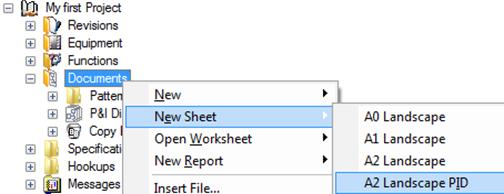
1. Use the function New Sheet in the context menu to create a sheet under the drawing folder P&I Diagram.
2. Select the template A2 Landscape PID.
. 
The drawing sheet is created, and the dialog New [Sheet] for the sheet attributes is opened.
3. Enter the sheet number 1 as sheet designation and Methanol delivery as comment.
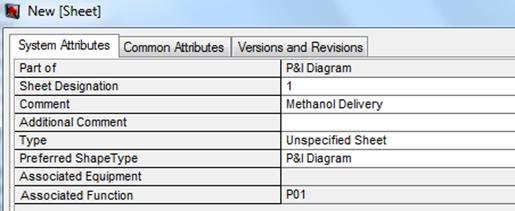
4. Assign the plant to sheet by clicking on the selection button  on the right margin of the line Associated Function. The selection window for plants is opened.
5. Click on the plant P01, and close the dialog with OK. The P&I diagram is now assigned to the plant.
The P&I diagram is shown as link icon in the folder Functions under the plant P01.
In the document folder in addition to the sheet number, the function is represented.