If wire harnesses are not declared of the type "Wire harness", then the functions required for the construction/design of the cable circuit diagrams do not work either.
8.14.1 Creating a wire harness
To be able to create cable circuit diagrams, these and their contents must be assigned to wire harnesses.
For this reason wire harnesses should be created before creating cable circuit diagrams.
In EB, wire harnesses are autonomous objects in the structured tree, under which wire harness objects such as wires, connectors, inline connection points etc. are assigned. There is no object class of its own for wire harnesses, therefore the structurally related object class Cable is to be selected for wire harnesses. Nonetheless a type of its own is used for the wire harnesses in the Cable object class. The cable is specified as wire harness accordingly.
|
|
If wire harnesses are not declared of the type "Wire harness", then the functions required for the construction/design of the cable circuit diagrams do not work either. |
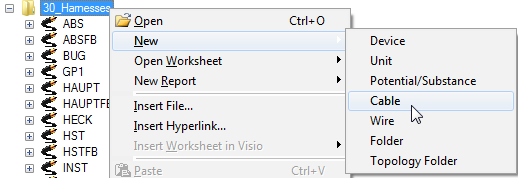
1. Under the system folder Equipment of the EB Explorer, select 30_Harnesses and then New -> Cable in the context menu.
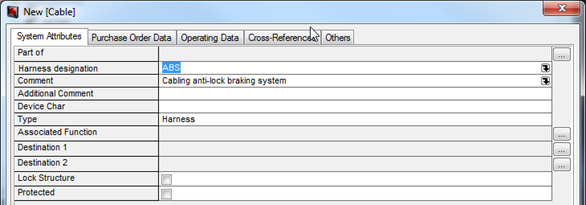
The dialog for creating a new cable is opened.
2. Select the harness via a click on the field Type and then a click on the button that appears on the right of the field.
The tab and the attribute designation are adapted.
3. Use the field Harness designation to enter the designation. e.g. WH for wire harness, and a numbering.
4. In the field Comment, enter e.g. the designation.
5. Close the dialog with OK.
A new wire harness has been created under Equipment -> 30_Harnesses.
|
Figure 213 Creating a wire harness |