Moving and merging an object
Devices and units can be moved and merged using the drag and drop functionality. During that process, the elements of the source object are merged with the elements of the destination object. This can only be carried out within the Equipment folder.
The structure of the source object is only added to the structure of the destination object if the merge reference matches for both objects. The merge reference consists of the following attributes, if they are available on the object:
- Object name (AID5) + TID (AID7) + Pin position (AID250)
- or Position (AID261) + TID (AID7) + Pin position (AID250), if the object name is empty for the source and destination object.
If the merge references match, the destination object is kept, the associations (e.g. wire targets) of the source object are copied to the destination object if this is permitted for the destination object, and the source object is deleted.
All source objects for which the merge references do not match are copied to the destination.
To move and merge an object
- Select the object in the navigation pane.
- Press M while moving the object.
- The cursor changes while hovering over a destination object.
- Release the mouse button to merge the source object and the destination object.

Example
A project has two units, each with a +EX1 -M5.1 and +EX2 -M5.1x motor with different pins.
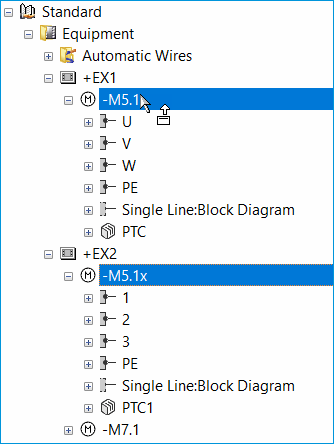
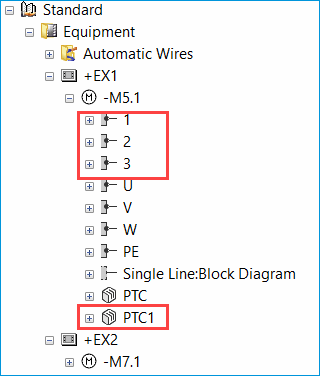
Once +EX2 -M5.1x is copied and merged with +EX1 -M5.1, +EX1 -M5.1 also has the pins of +EX2 -M5.1x. As the merge references in the source and destination objects match for the PE and Single Line:Block Diagram pins, these pins are not copied into the structure of +EX1 -M5.1.
Moving and merging devices or sub-devices without a designation can lead to unpredictable results.