Dialog boxes: customizing types and objects
A dialog in Engineering Base is an element of the graphic user interface that is used by users to enter their input.
Most Engineering Base objects have dialog boxes that can be customized. All dialog boxes consist of attributes and tabs. For every object type, a default dialog is defined in the Type definitions.
Using Define Dialog, you can adapt the dialogs of type definitions or individual objects such as devices and sheet templates.
In this context, you can assign attributes from the Available attributes list to existing or newly added tabs in the Dialog Box Configuration area.
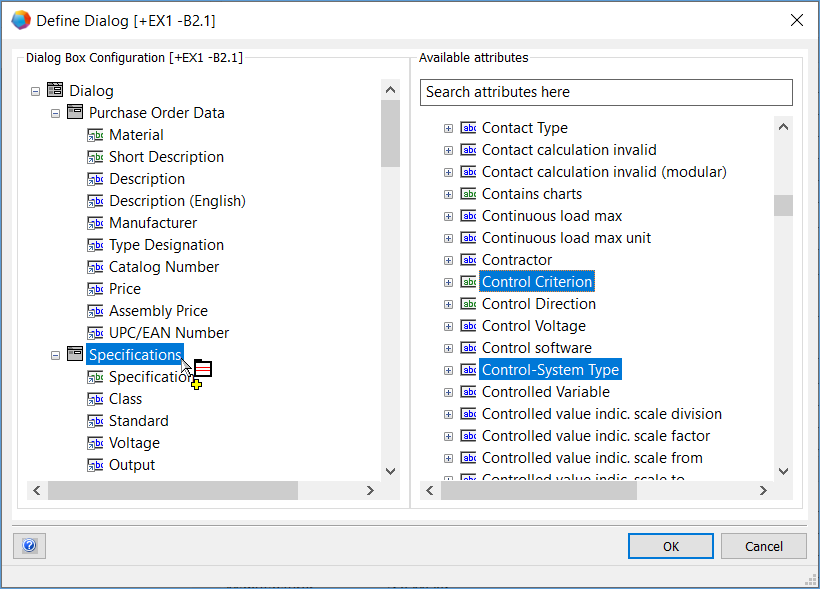
In the Available Attributes area, a filter row (Search Attributes here) is available. Enter a string of at least 3 characters into the row to limit the display of the available attributes to only those attributes containing that string.
Using a multi selection, you can:
- transfer several attributes at the same time from the list of Available attributes to a dialog box tab.
- remove several attributes at the same time from a dialog box tab.
- move several attributes at the same time on a dialog box tab.
- delete several attributes at the same time from the list of Available attributes, if no object in the database uses them.